
Add, edit and remove items by hand
For: Everyone
Open Menu, tap Add Item inside a group, fill in the name, price and description, and tap Submit. Groups keep your menu in order, and you can add as many as you like.
Add a group
Section titled “Add a group”A group is a heading on your menu, like “Breads” or “Cookies.” Tap Add Group and name it. Items you haven’t put in a group sit under Uncategorised.
Add an item
Section titled “Add an item”- Open Menu.
- In the group you want, tap Add Item.
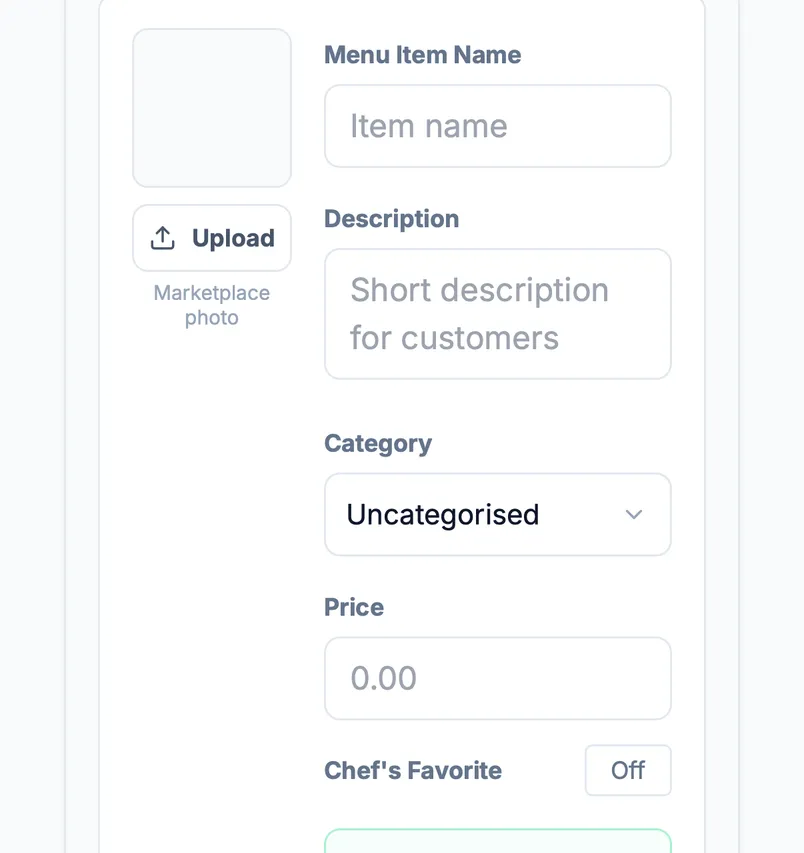
- Fill in the form:
- Upload a photo.
- Menu Item Name and Description.
- Category, which is the group it sits in.
- Price.
- Chef’s Favorite, a switch for marking a standout item.
- Dietary / Tags: Vegan, Vegetarian, Gluten-Free, Dairy-Free, Nut-Free, Halal, Kosher, Spicy.
- Tap Submit.
The Marketplace box on the form
Section titled “The Marketplace box on the form”Lower on the same form is a Marketplace box with two choices, On marketplace and Menu only. Leave it on Menu only unless you’re selling this item on the Market. See Menu and Market: what’s the difference?
Didn't find your answer? Email hello@omahafoodie.com. A person in Omaha writes back.